Private infrastructure. Beautiful software.
Own your work.Keep your data.
Four modern business tools — email, notes, training and partner operations — deployed on infrastructure you control, by the team that builds them.


The GoIndy suite
One independent stack.
Four essential workflows.
Software should serve your organisation — not harvest it. GoIndy combines refined everyday tools with deployment, security and support from one accountable team.
Email nobody else can read.
End-to-end encrypted business email, sealed to keys held only by your people.
02 / NOTESYour thinking stays yours.
Rich notes, drawing, media and secure sync on a server you run.
03 / TRAININGTurn knowledge into proof.
Structured learning, assessments and publicly verifiable certificates.
04 / PARTNERSRun your channel as one.
Onboarding, deals, quotes, licences and enablement in a single portal.
01 — GOINDY MAIL
Email your provider can’t read.
Every message is scanned, encrypted the moment it lands, then stored as ciphertext. The key that opens it never leaves your people’s devices — so a breach of our servers hands an attacker nothing but noise.
OpenPGP · Argon2id · Postgres RLS · SPF · DKIM · DMARC · IMAP · SMTP · TOTP
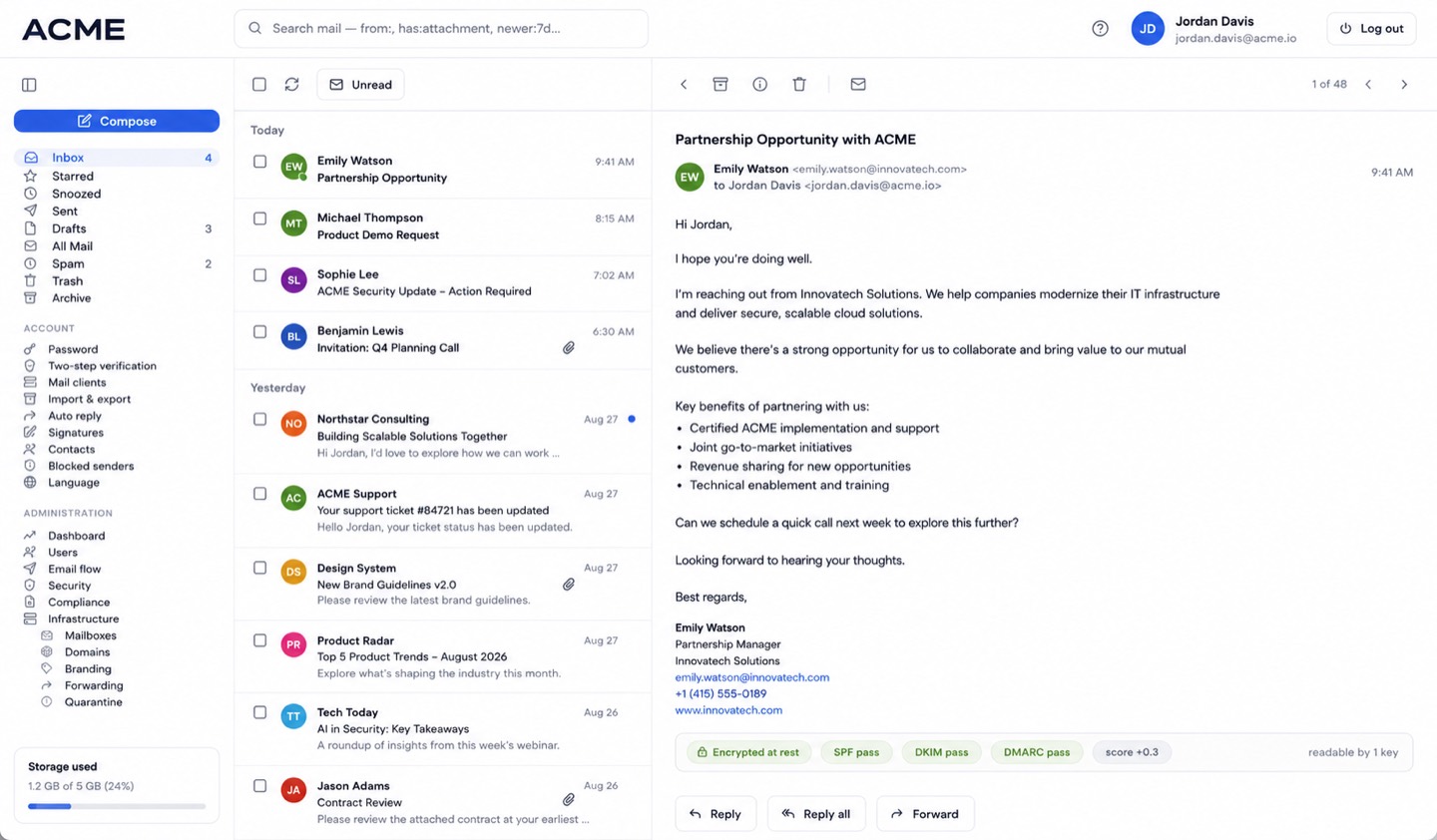
Inbox and reading pane: every message stamped “encrypted at rest”, with SPF, DKIM and DMARC results in plain sight. 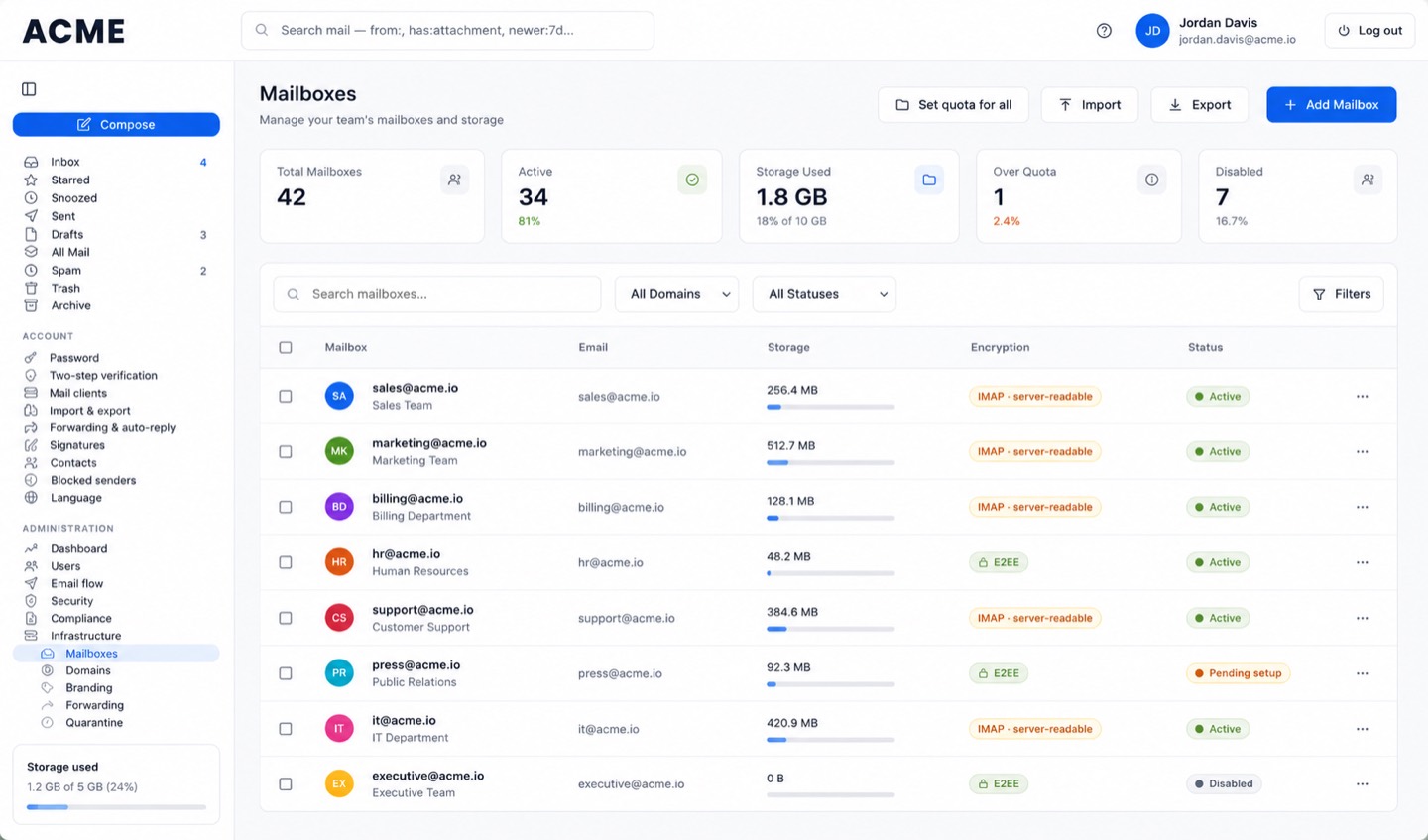
Mailbox administration: quotas, storage, per-mailbox encryption mode and status across every domain you run. 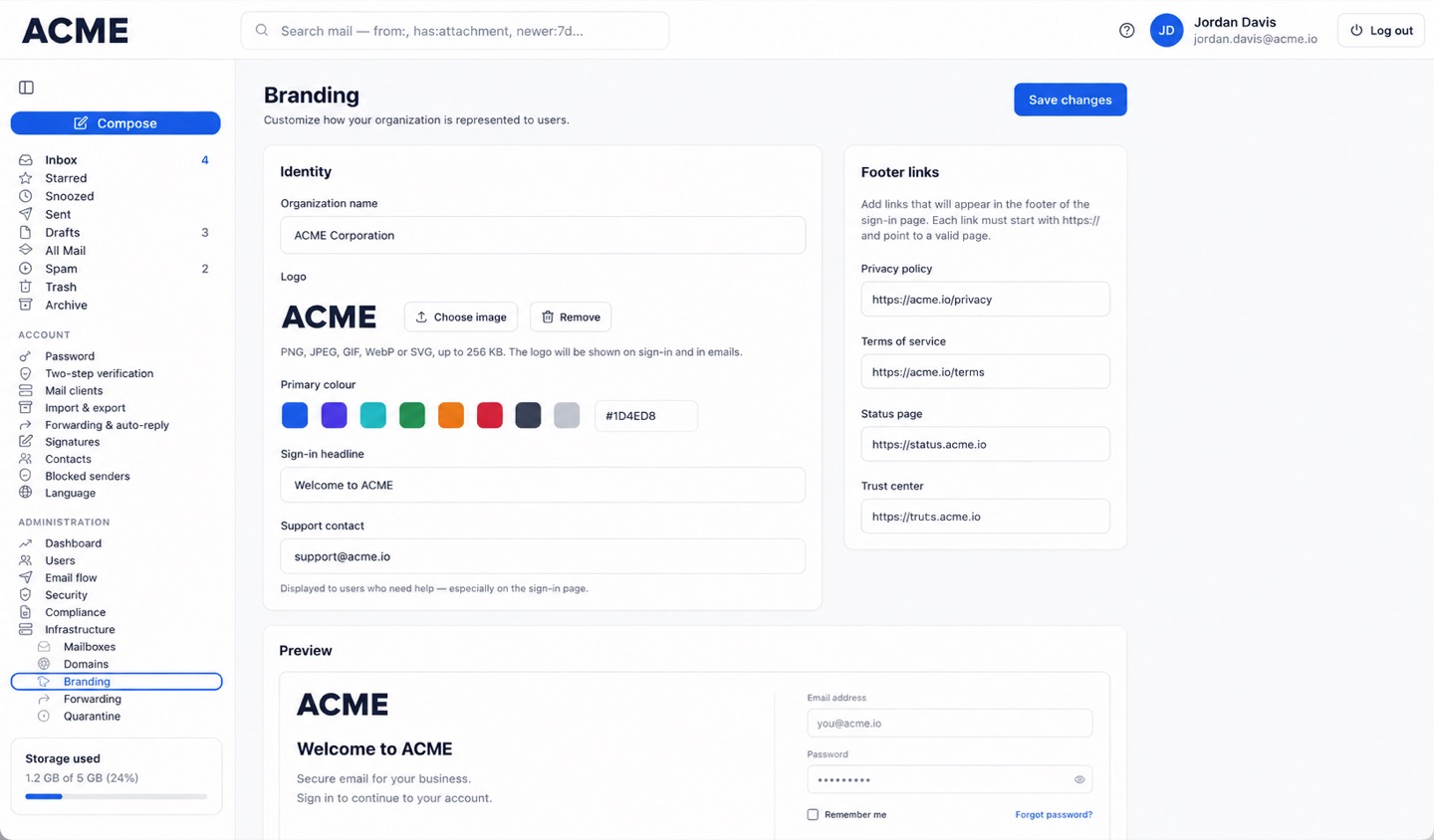
White-label branding: your logo, colours, sign-in headline and footer links — with a live preview. 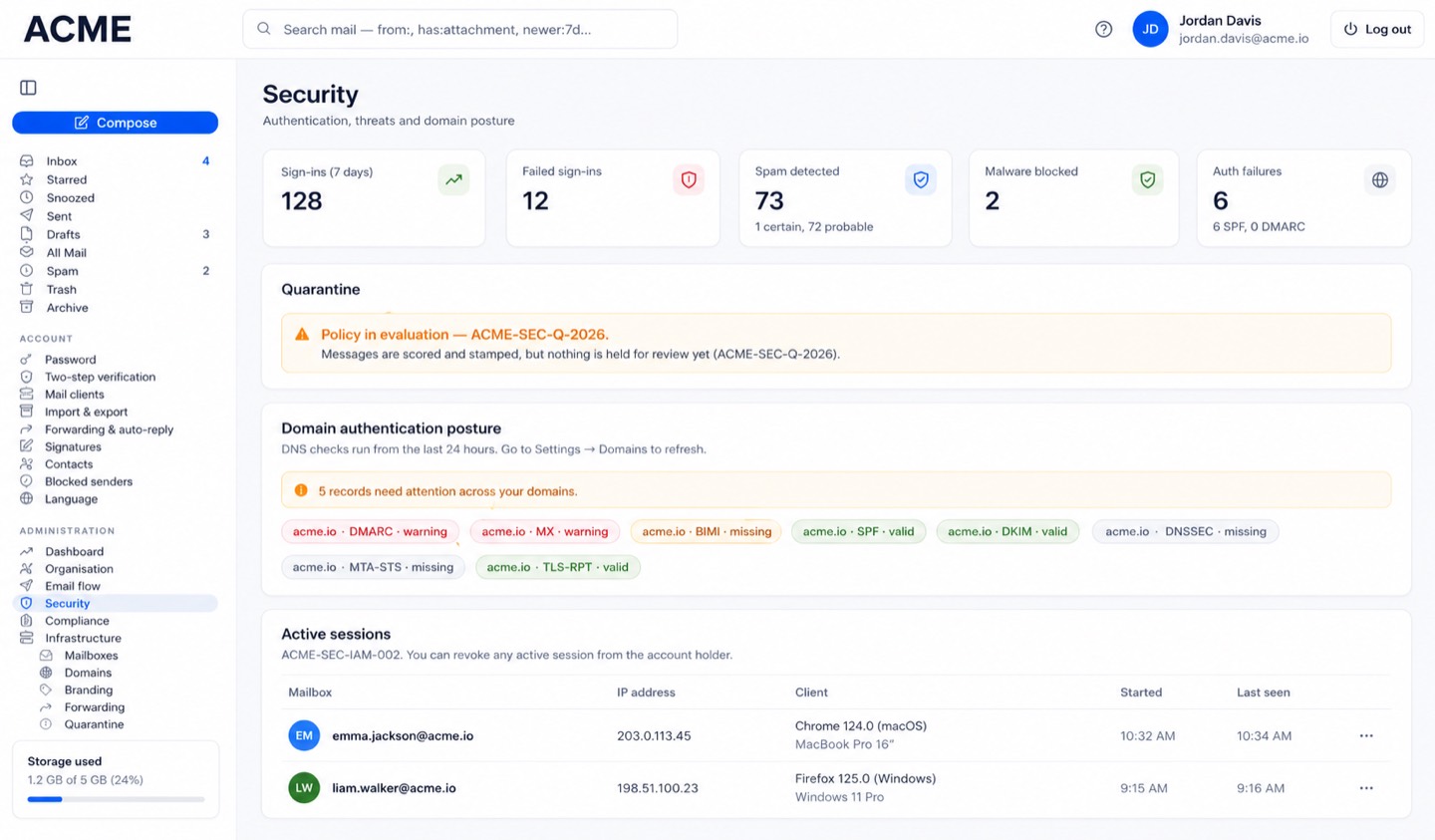
Security posture at a glance: threats blocked, DNS authentication records, quarantine and every active session. 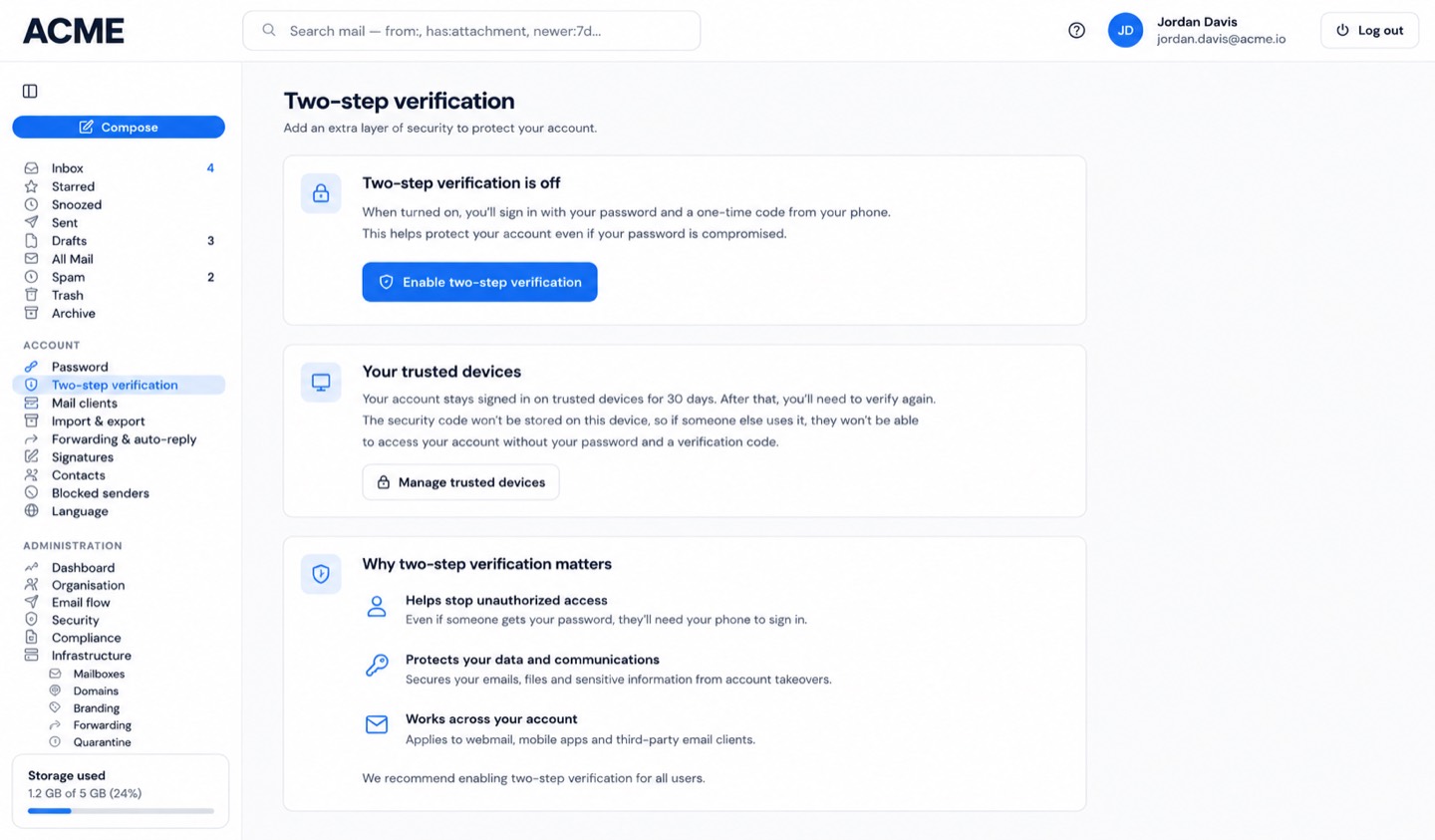
Two-step verification and trusted devices — self-service for users, enforceable by administrators.


Encrypt-on-delivery
Zero-access, without the friction.
Most “secure email” asks you to trust a promise. GoIndy removes the need to trust us at all — because we hold no key that can open your mail. Filtering still works. Search still works. Mobile still works. The content just isn’t ours to read.
Mail arrives
Every message is checked for spam and malware once, in the clear, before anything is stored.
Sealed on delivery
The instant it lands it is encrypted to your user’s public key — the last moment it exists as plain text on our side.
Stored as ciphertext
Subject, body, attachments and attachment filenames are encrypted at rest. A database dump reveals nothing readable.
Opened on your device
Your password derives the key inside your browser or app. It never reaches us, so we can never be compelled to hand it over.
Honest about the line. We can see the envelope — who a message is from, who it is to, when it arrived and how big it is — because that is the minimum needed to route and filter mail. We cannot see what is inside it. Where a regulator or a court asks, we can only produce what we actually hold: metadata, not content.
Privacy by design
Protections that are structural, not settings an admin might forget.
Zero-access encryption
OpenPGP under the hood. Argon2id stretches your password into a key that unwraps your private key — and never touches our servers.
Encrypted at rest and in transit
Sealed the moment it is delivered and served only over TLS. Nothing readable is ever written to disk.
No tracking pixels
Remote images are held back by default, so senders cannot tell when you opened a message. Load them per message, or set your own preference.
Isolated per organisation
Every tenant’s data is walled off at the database itself with row-level security — not just checked in application code.
Everyday email
A modern client that happens to be encrypted.
Powerful search
A real query language — from:, has:attachment, newer:7d — plus unread filters and bulk actions that move, mark and clear in one go.
Rich, safe messages
Compose with formatting and signatures; read HTML mail rendered in a sandbox so nothing in a message can run against you.
Folders, threads and contacts
Inbox, Sent, Drafts, Spam, Trash and Archive, threaded conversations and an address book — everything where you expect it.
Bring your history
Import existing mail from an mbox export — and take it with you whenever you like. No lock-in.
On every device
The security model never gets in the way of the phone in someone’s pocket.
Native Android app
Push notifications that stay private: the server sends a contentless wake-up and your phone decrypts the subject on-device. Google never sees who wrote to you.
Your usual mail apps
Standard IMAP and SMTP with per-device app passwords — Apple Mail, Outlook and Thunderbird all just work.
Seven interface languages
English, Spanish, French, Italian, Portuguese, Turkish and Russian — with product documentation to match.
Auto-reply and forwarding
Vacation responders and forwarding rules — with the mailbox owner always notified, so a silent forward can never be set behind someone’s back.
Administration and governance
Run it like the business tool it is — with power scoped to exactly who should hold it.
Multi-organisation and white-label
Run many organisations and domains from one platform, each with its own name and logo. Your brand, not ours.
Least-privilege roles
Organisation, security, compliance and helpdesk admins each get only what their job needs — and granting a role is itself a guarded, audited action.
Append-only audit trail
Every administrative action is written to a log that can only be added to — not edited, not deleted, not even by the operator.
Governed recovery
Optional organisation escrow lets a company recover mail when a key is lost — as disclosed policy for everyone, role-gated and logged. Never a hidden tap on one person.
Security and delivery
The unglamorous parts, done right.
Spam, malware and phishing
Every message is scored and virus-scanned, with quarantine and your own block or allow rules. Impersonation checks catch look-alike names and domains.
Two-step verification
Authenticator-based 2FA with recovery codes, plus self-service password changes that re-lock your key without losing a single message.
Lands in the inbox
SPF, DKIM and DMARC configured properly, TLS certificates that renew themselves, and brute-force protection watching the doors.
Backups that are proven
Every backup is test-restored and its contents verified — a file that merely exists is not treated as a backup until it has been read back successfully.
02 — GOINDY NOTES
Ideas at local speed. On every screen.
A private, mobile-first workspace for writing, drawing, scanning, recording and organising — running on your own local server, so your knowledge never becomes someone else’s training data.
Web · iOS · Android · Foldables · Desktop browsers · Multi-user · Dark mode
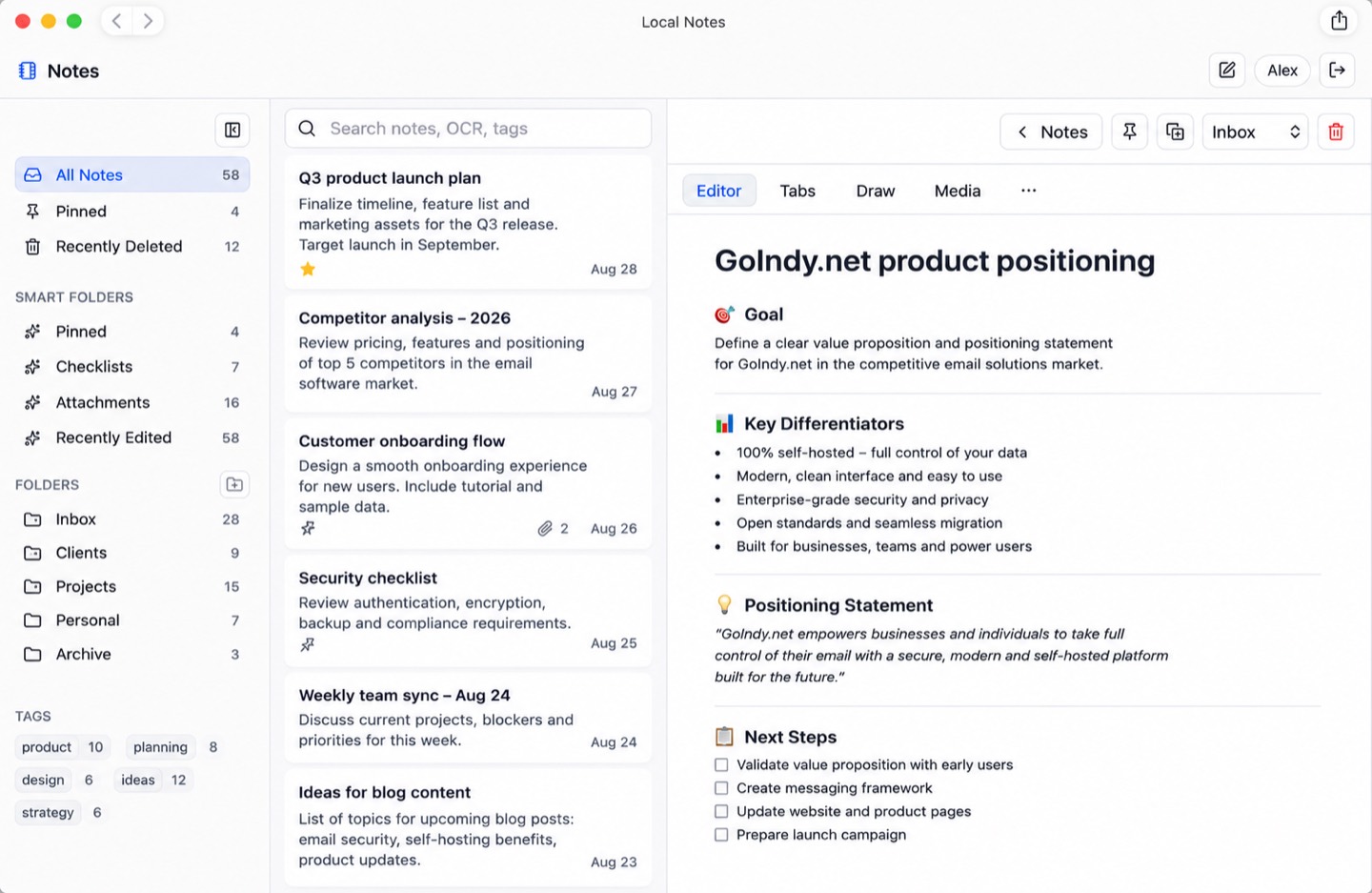
Folders, smart folders and tags on the left; a structured, formatted note in the editor on the right. 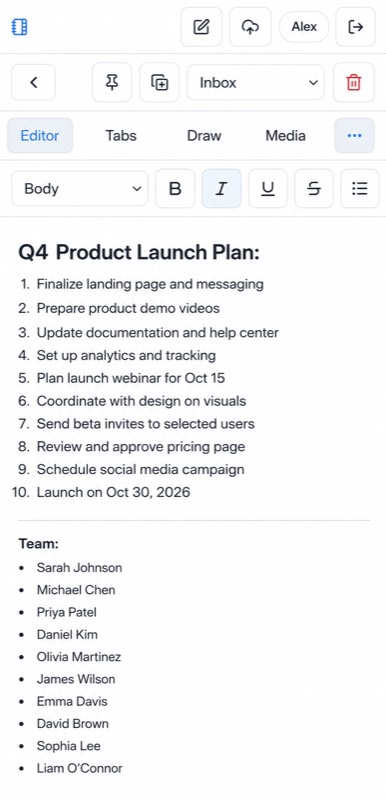
The same editor on a phone: headings, lists, checklists and formatting, sized for one thumb. 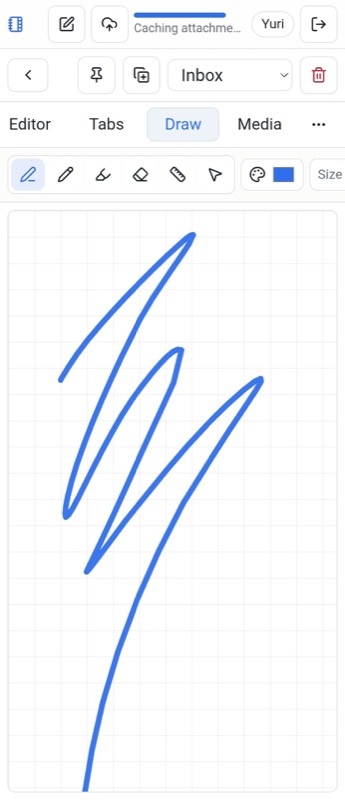
Draw and handwrite with pens, pencils, markers, rulers and shape recognition — finger or stylus. 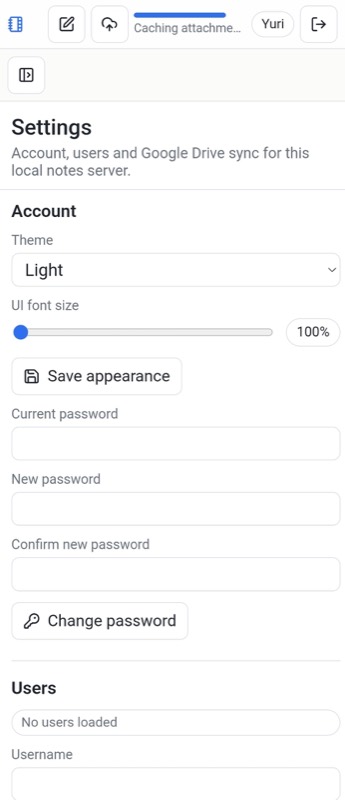
Per-user settings: theme, interface font size, password changes and admin user management. 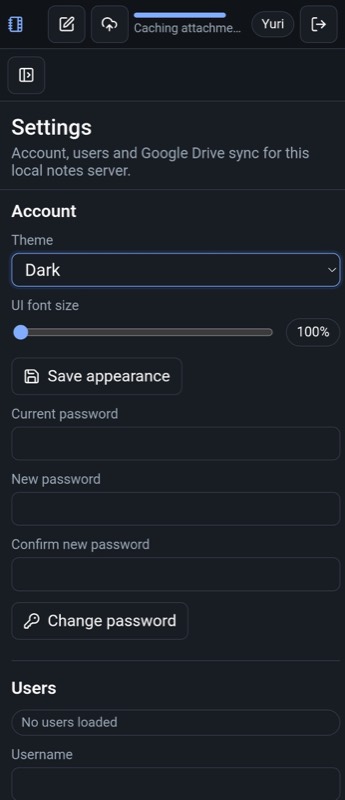
Dark mode throughout, remembered per user — not a global switch someone else decides for you.


Create rich notes
Automatic titles from the first line, headings, bold, italic, highlights, bulleted, numbered and dashed lists, interactive checklists, nested indentation, tables, collapsible sections, undo/redo and in-note search.
Draw, handwrite and mark up
Pens, pencils, markers, erasers and rulers with adjustable thickness, opacity and colour — plus shape recognition, selectable strokes, and markup over images, screenshots and PDFs.
Capture every kind of media
Photos, video, camera captures, PDFs, scanned documents, link previews, maps and locations, files, and audio recorded in-app as MP3 or WAV — renameable, downloadable and playable inline.
Built-in music tools
A Tabs section for guitar and bass tablature with chords, fingering diagrams and automatic chord recognition from fretboard shapes — including slash chords, omitted fifths and complex voicings.
Organise without friction
Folders and subfolders, smart folders, #tags with automatic filtering, pinned notes, duplicates, recently deleted, gallery and list views, grouping by date and sorting by created, edited or title.
Private, multi-user, sync-ready
User login with long-lived mobile sessions, password changes, admin user management, per-user appearance and font scaling — and Google Drive sync only after you authenticate.
03 — TRAINING & CERTIFICATION
Turn company knowledge into certified competence.
Publish structured courses, guide learners to readiness, assess what they actually know, and issue branded credentials anyone can verify — without building an LMS from scratch.
Onboarding · Product training · Partner enablement · Compliance proof
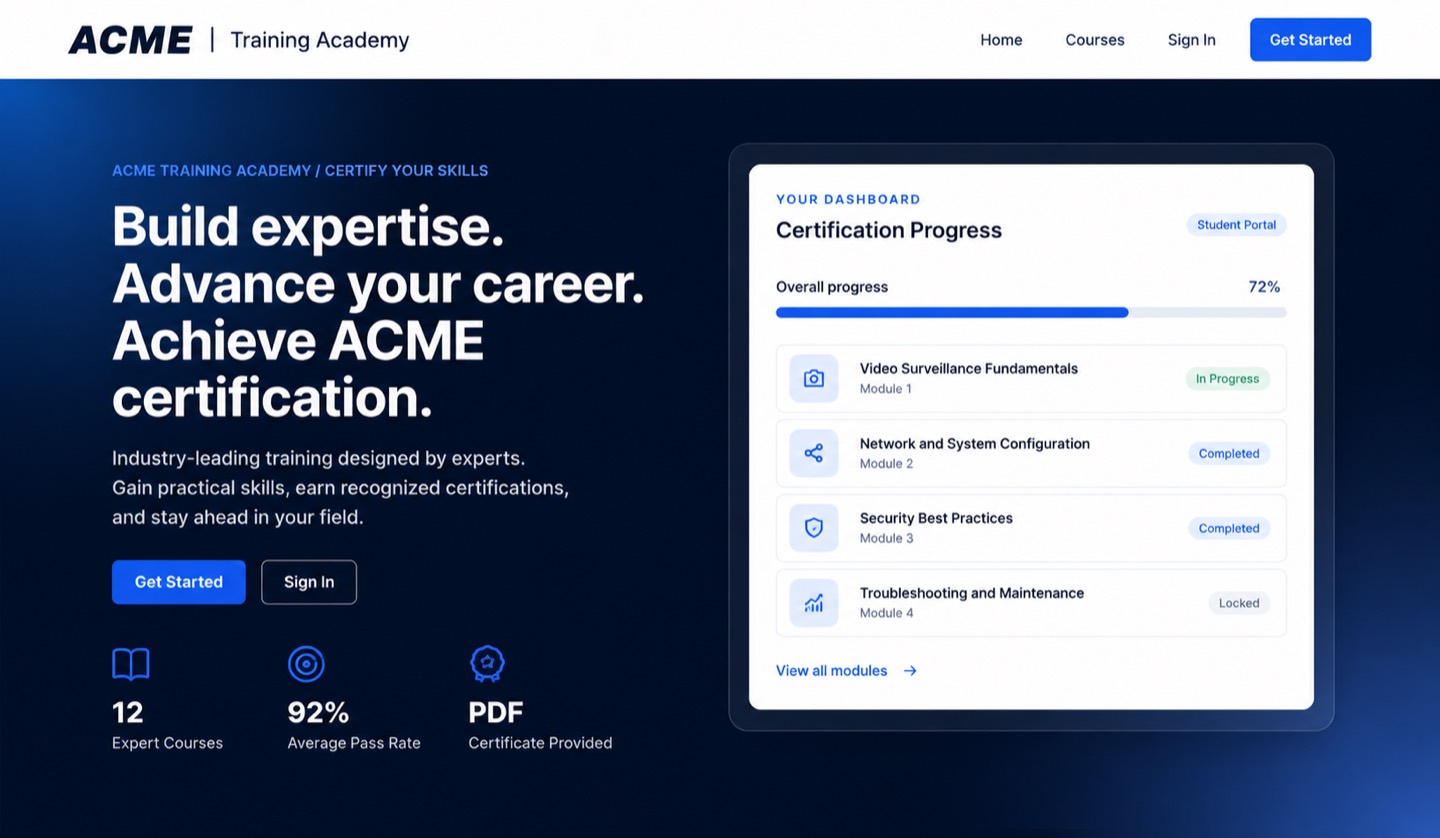
Your own branded academy: a public front door, course catalogue and live certification progress. 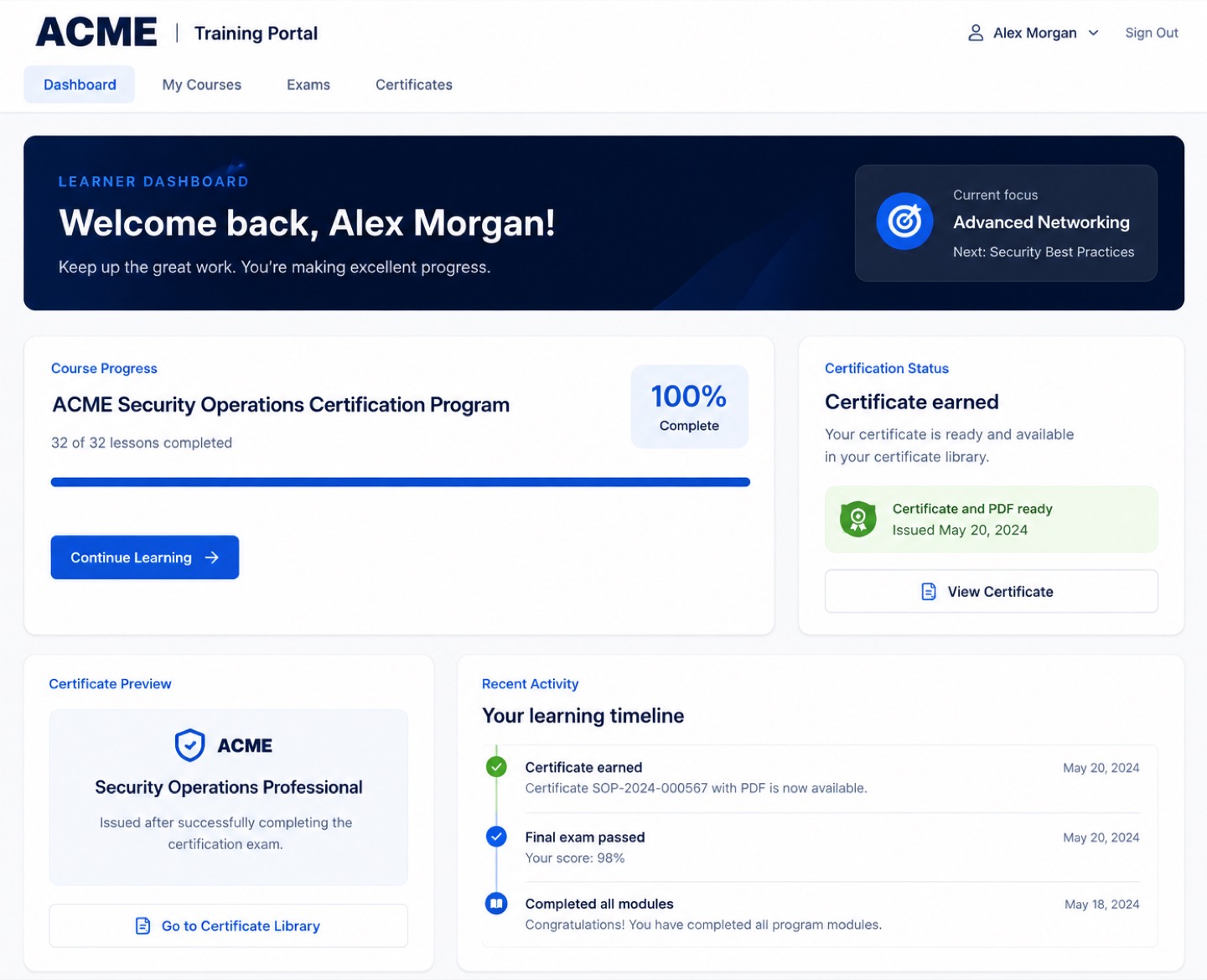
The learner dashboard: progress, current focus, certificate status and a full activity timeline. 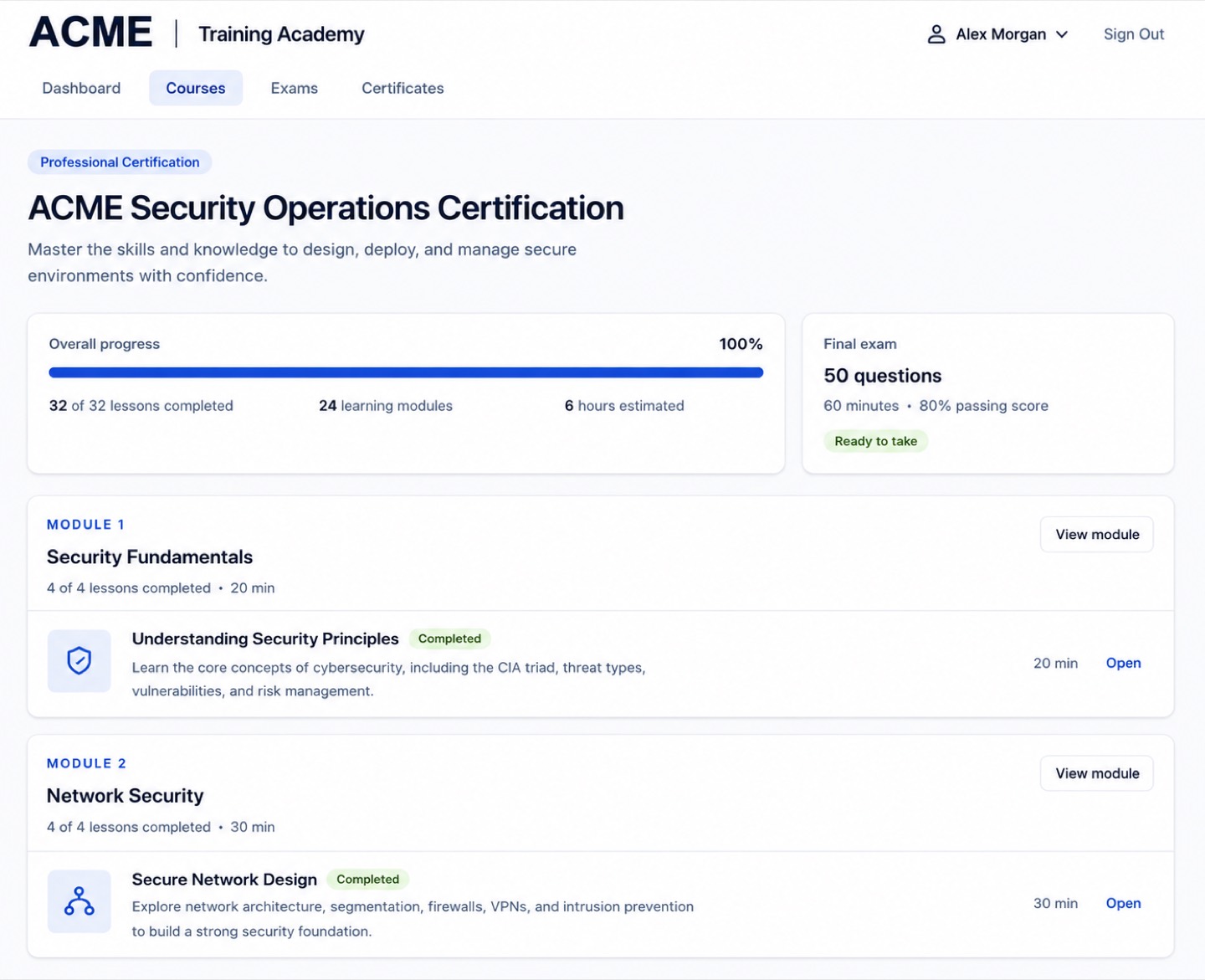
Course structure made explicit: modules, lessons, estimated time, and exactly what the final exam requires. 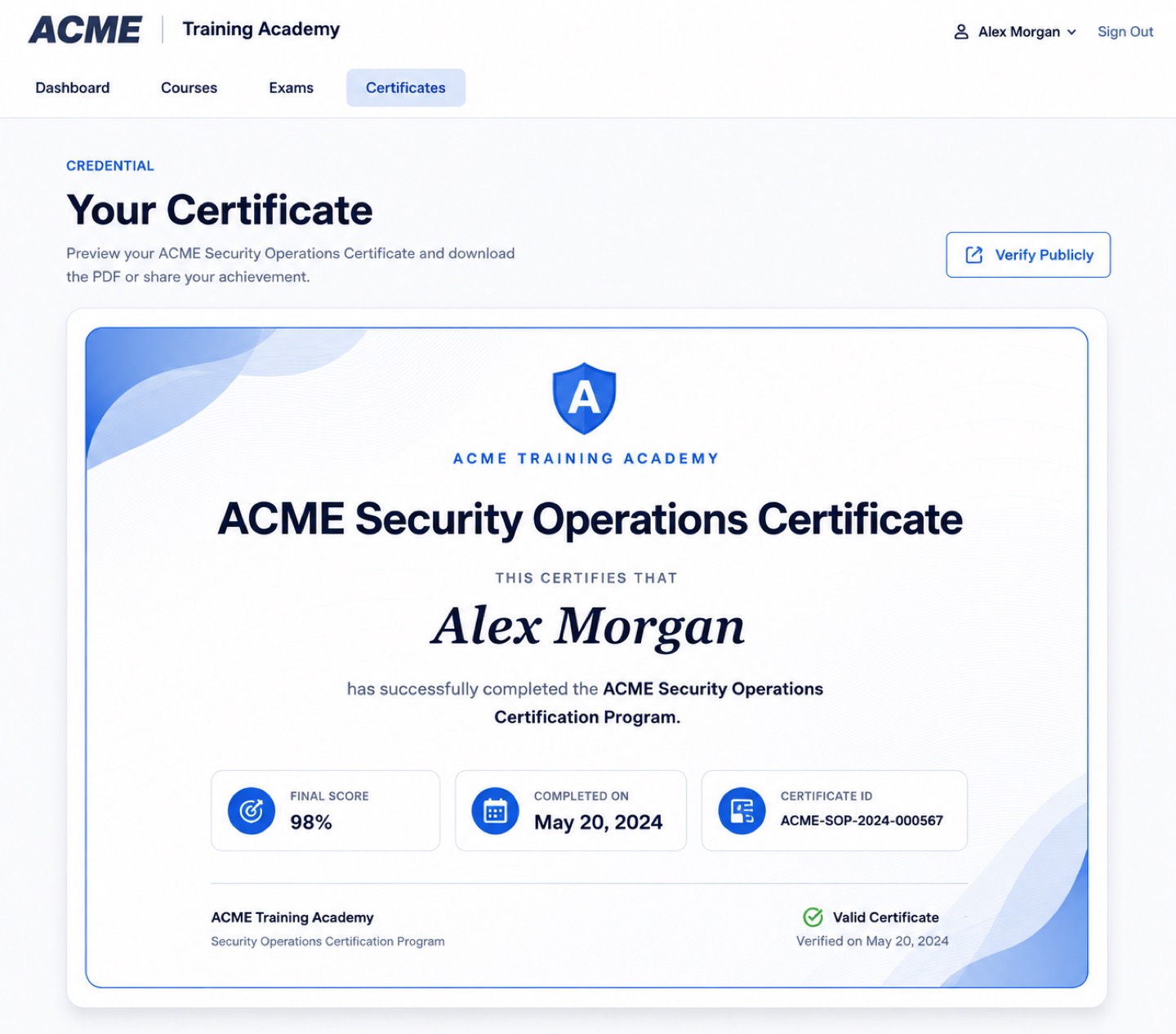
The credential itself: score, date, a unique certificate ID and a public verification link to share.


Structured courses
Organise training into modules and lessons that follow a clear, logical path — and reuse it for every new hire, partner or customer.
Progress tracking
Learners and managers see completed lessons, remaining content and readiness for assessment in one dashboard.
Gated final exam
The certification test unlocks only when the required lessons are complete, so the credential means something.
Branded certificates
Professional PDF certificates generated automatically on a pass, carrying your identity rather than a vendor’s.
Public verification
Employers, partners and customers confirm a credential online with its unique certificate ID.
Admin control
Manage users, content, questions, attempts and issued certificates from one console, with roles separating learners from staff.
04 — PARTNER PORTAL
One connected platform for every partner stage.
Give partners one secure place to apply, register deals, build quotations, request licences and work with your regional teams — while headquarters keeps complete visibility from first application to closed business.
Distributors · Resellers · System integrators · Installers · Technology partners
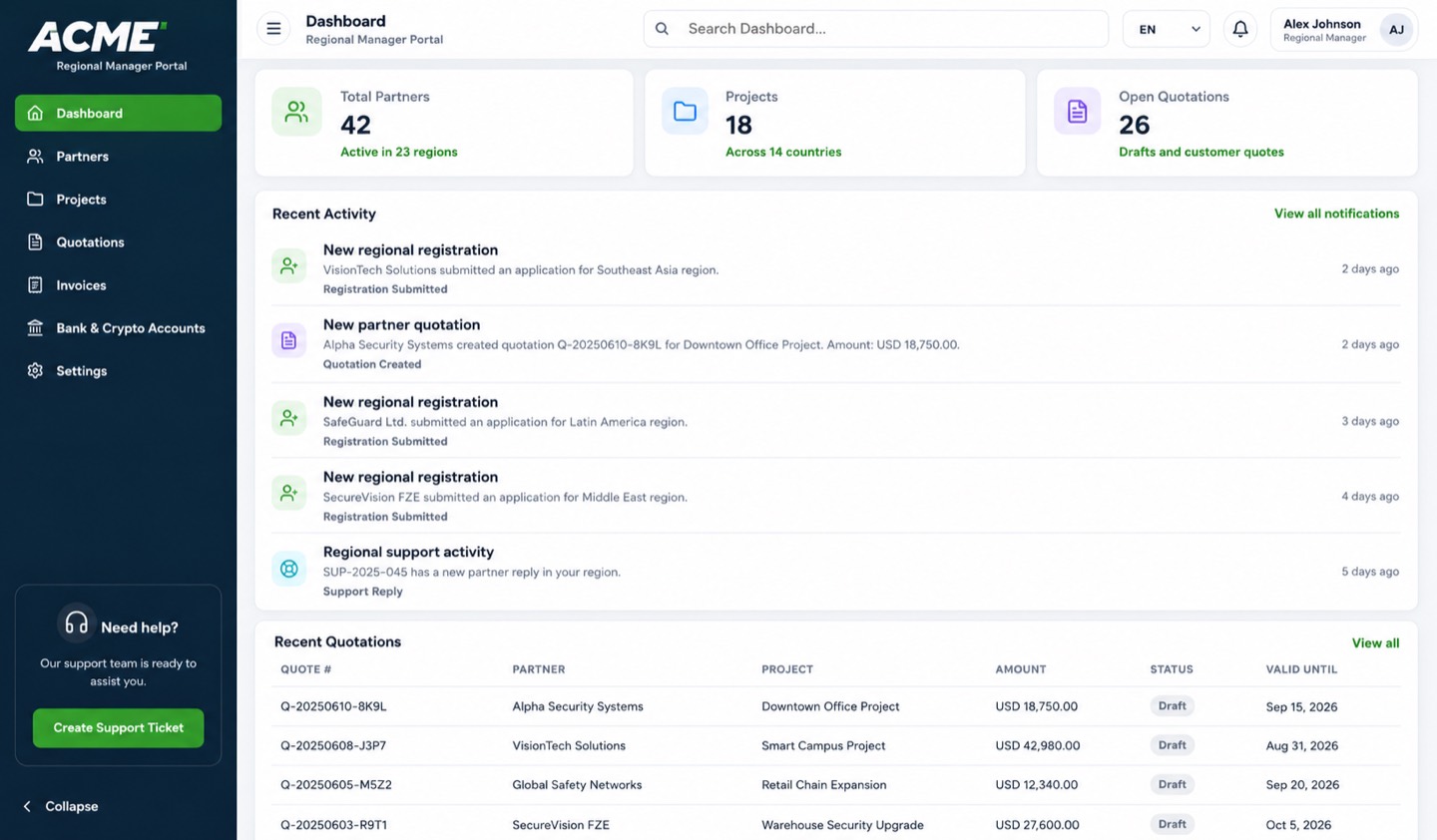
The regional dashboard: partners, projects, open quotations and every registration as it happens. 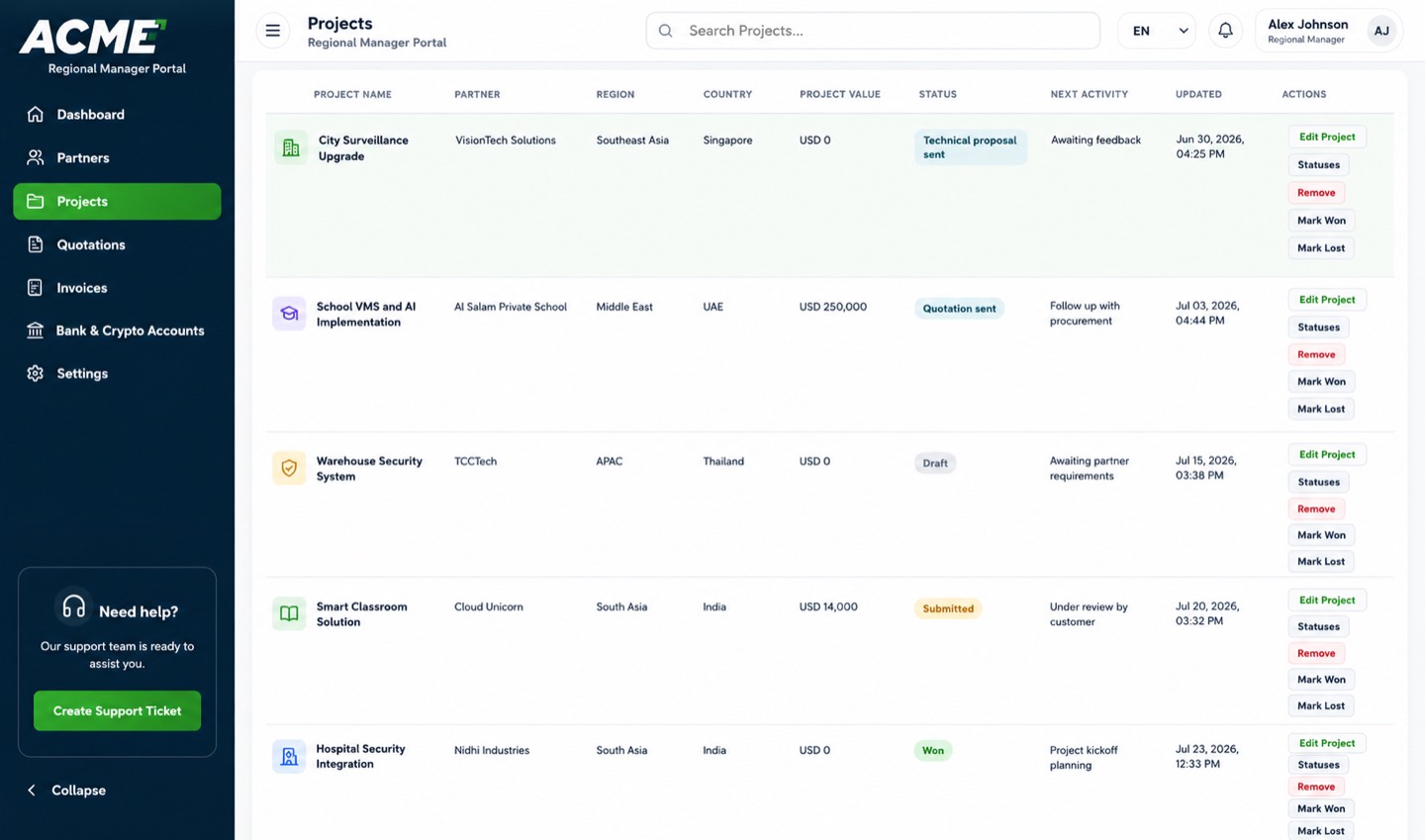
Registered opportunities with value, region, status and next action — deal protection made visible. 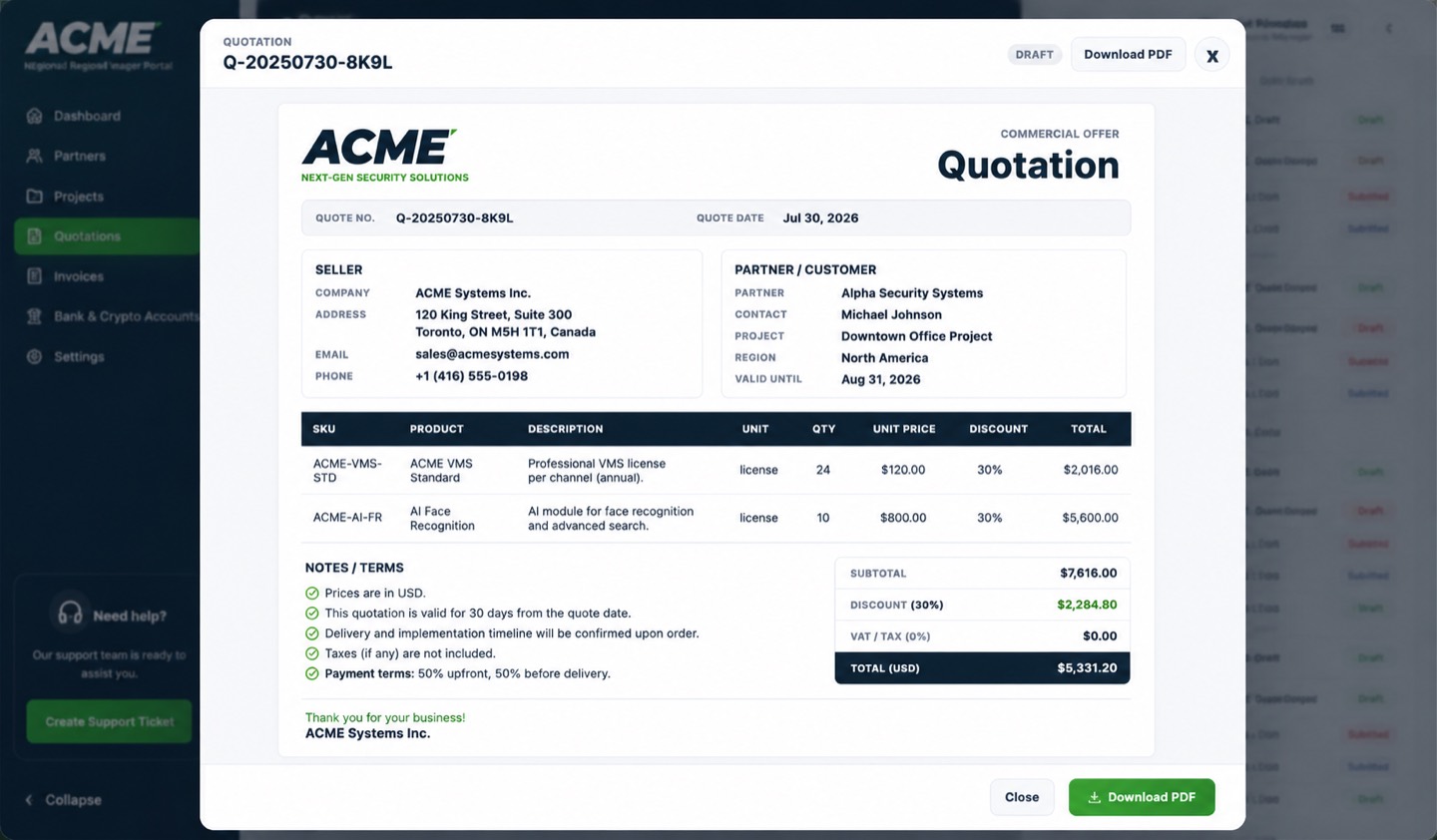
Customer-ready quotations: SKUs, discounts, taxes, terms and a branded PDF in one click.


Digital onboarding
Online applications capture company details, market experience, technology expertise and demo-licence needs. Applicants get a reference number and can track approval status themselves.
Deal registration
Register customer opportunities with value, quantities, expected close date and notes — then track them through draft, review, approval, delivery, won, lost, paused or cancelled.
Quotation to invoice
Build quotations from approved price lists or custom lines with taxes, partner discounts, terms and validity — then convert an approved quotation into an invoice without retyping anything.
Licences and payments
Track generated and delivered licence keys per product, customer and partner, and monitor invoice amounts, due dates and draft, sent, paid, overdue or cancelled status.
Global by design
Multi-region structure with assigned managers, region-aware discount rules, multi-currency operations including USD, EUR, GBP, TRY, AED and RUB, and bank or crypto payment accounts per region.
Enablement built in
Region-specific brochures, presentations, guides, demo videos, battlecards and certification links, plus a notification centre with digest frequency and quiet hours.
How ownership happens
Your software. Your infrastructure.
Our expertise beside you.
We take you from first conversation to a production system your own team can confidently operate — and we stay reachable afterwards.
Discover
We map users, workflows, security requirements, integrations and your preferred deployment model.
Deploy
Dedicated or fully self-hosted — on your domain, on your hardware or cloud, in the jurisdiction you choose.
Migrate
We configure identities, import existing data, validate mail flow and DNS, and apply your branding.
Operate
Documented handover, proven backups, monitoring and support at whatever level you want to keep.
Installation & configuration services
Self-hosted doesn’t have to mean self-supported.
Own the infrastructure without carrying the deployment burden. vCloud.ai does the careful, unglamorous work that makes production software reliable — and hands you the keys, the documentation and the runbook at the end of it.
Architecture & sizing
Topology, resources, storage, backup strategy and growth planning, matched to your real usage — not a brochure number.
Secure deployment
TLS, domains, DNS, SPF/DKIM/DMARC, hardening, firewalling and identity configuration done properly the first time.
Migration
Mailboxes, users, notes, courses and partner records moved across with validation and a rollback plan.
Managed support
Monitoring, upgrades, restore tests, security patching and a human to reach when something needs attention.

Built by vCloud.ai
Engineering independence into everyday software.
vCloud.ai builds secure platforms for organisations that value practical innovation, accountable infrastructure and control over their own data.
Our background is in systems that have to keep running — video management and analytics deployed across global channel networks, where uptime, data residency and partner trust are not optional extras. GoIndy brings that discipline to the tools teams actually touch every day.
Every product in the suite is designed to be handed over: your domain, your servers, your jurisdiction, your data — with our team available for as much or as little of the operational load as you want to delegate.
Questions we actually get asked
Straight answers before the sales call.
What does “self-hosted” mean in practice?
It means the software runs on infrastructure you control — your own servers, your private cloud, or a dedicated instance in a region you choose. You hold the domain, the data and the backups. We can install and operate it for you, or hand it over entirely with documentation and a runbook.
If mail is end-to-end encrypted, how does spam filtering still work?
Filtering happens once, on delivery, before anything is stored. A message is scored for spam, scanned for malware and checked for impersonation while it is still in memory — then it is encrypted to the recipient’s public key and written to disk as ciphertext. From that moment nothing on the server can read it, including us.
What can you actually see, and what would you hand over to a court?
We can see the envelope: sender, recipient, timestamp and message size — the minimum required to route and filter mail. We cannot see subjects, bodies, attachments or attachment filenames. If a lawful demand arrives, we can only produce what we hold: metadata, never content.
Can our team keep using Outlook and Apple Mail?
Yes. GoIndy Mail speaks standard IMAP and SMTP with per-device app passwords, so Apple Mail, Outlook, Thunderbird and mobile clients work as usual. There is also a native Android app with contentless push notifications, and a fast web client if you prefer the browser.
Which languages does the platform support?
This site is available in English, Spanish, Portuguese, Turkish and Russian. The mail platform interface ships in seven languages — English, Spanish, French, Italian, Portuguese, Turkish and Russian — with documentation to match. Additional languages can be added on request.
How long does a deployment take, and what does it cost?
A single-product deployment on prepared infrastructure typically takes days rather than months; migrations from an existing mail provider depend on mailbox count and history. Pricing depends on the products, user numbers and how much of the operational load you want us to carry — tell us your situation and we will quote it properly.
Are we locked in if we change our minds?
No. Mail can be imported from and exported to standard mbox files, notes and attachments remain downloadable, and the platforms run on open standards and open protocols. Leaving should be as practical as arriving — that is part of what owning your infrastructure means.
Let’s talk
What would you like to own?
Tell us which workflow you want to bring home. We reply with a straight assessment and the right deployment path — not a generic sales sequence.
Deployment · Dedicated, on-premise or private cloud
Languages · English · Español · Português · Türkçe · Русский
Response time · One business day, from a person who builds the product